Theme Designer

TIMELINE

Jun, 2023 - Dec, 2023

COMPANY

Microsoft

MY ROLE

Product Designer

STATUS

Shipped

Overview

Theme Designer is a B2B styling tool that lets Web3 brands tailor the visual style of an NFT online shop to their brand identity and business needs.

Results

40+

Hi-fi Designs

0

1

Milestone Hit

Next up

Review Center

IBM

Theme Designer

TIMELINE

Jun, 2023 - Dec, 2023

COMPANY

Microsoft

MY ROLE

Product Designer

STATUS

Shipped

Overview

Theme Designer is a B2B styling tool that lets Web3 brands tailor the visual style of an NFT online shop to their brand identity and business needs.

Results

40+

Hi-fi Designs

0

1

Milestone Hit

Next up

Review Center

IBM

Theme Designer

TIMELINE

Jun, 2023 - Dec, 2023

COMPANY

Microsoft

MY ROLE

Product Designer

STATUS

Shipped

Overview

Theme Designer is a B2B styling tool that lets Web3 brands tailor the visual style of an NFT online shop to their brand identity and business needs.

Results

40+

Hi-fi Designs

0

1

Milestone Hit

Next up

Review Center

IBM

Theme Designer

TIMELINE

Jun, 2023 - Dec, 2023

COMPANY

Microsoft

MY ROLE

Product Designer

STATUS

Shipped

Overview

Theme Designer is a B2B styling tool that lets Web3 brands tailor the visual style of an NFT online shop to their brand identity and business needs.

Results

40+

Hi-fi Designs

0

1

Milestone Hit

Next up

Review Center

IBM

Term Explaination

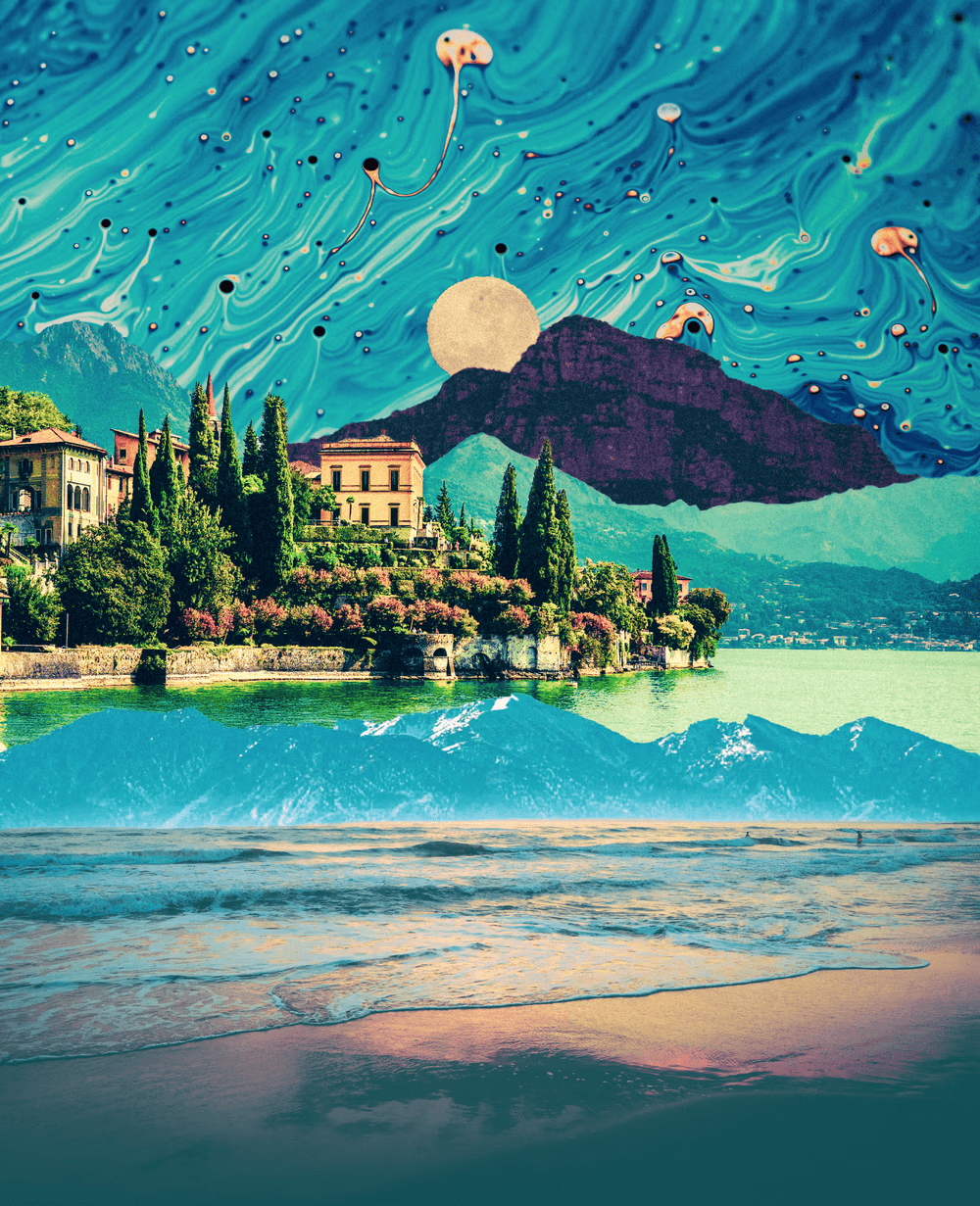
Non-fungible tokens (NFT) are unique blockchain assets representing specific digital items—often artistically-designed works in a consistent collection style. The following shows example NFTs from the collection One Night in August by artist Natasha Chomko.

NFT

/

Shadow of a Doubt
NFT

/

House of Ballons, 2020

What is PowerNFT?

PowerNFT is a one-stop B2B platform developed by Microsoft, enabling Web3 brands to create, manage, and sell NFTs.

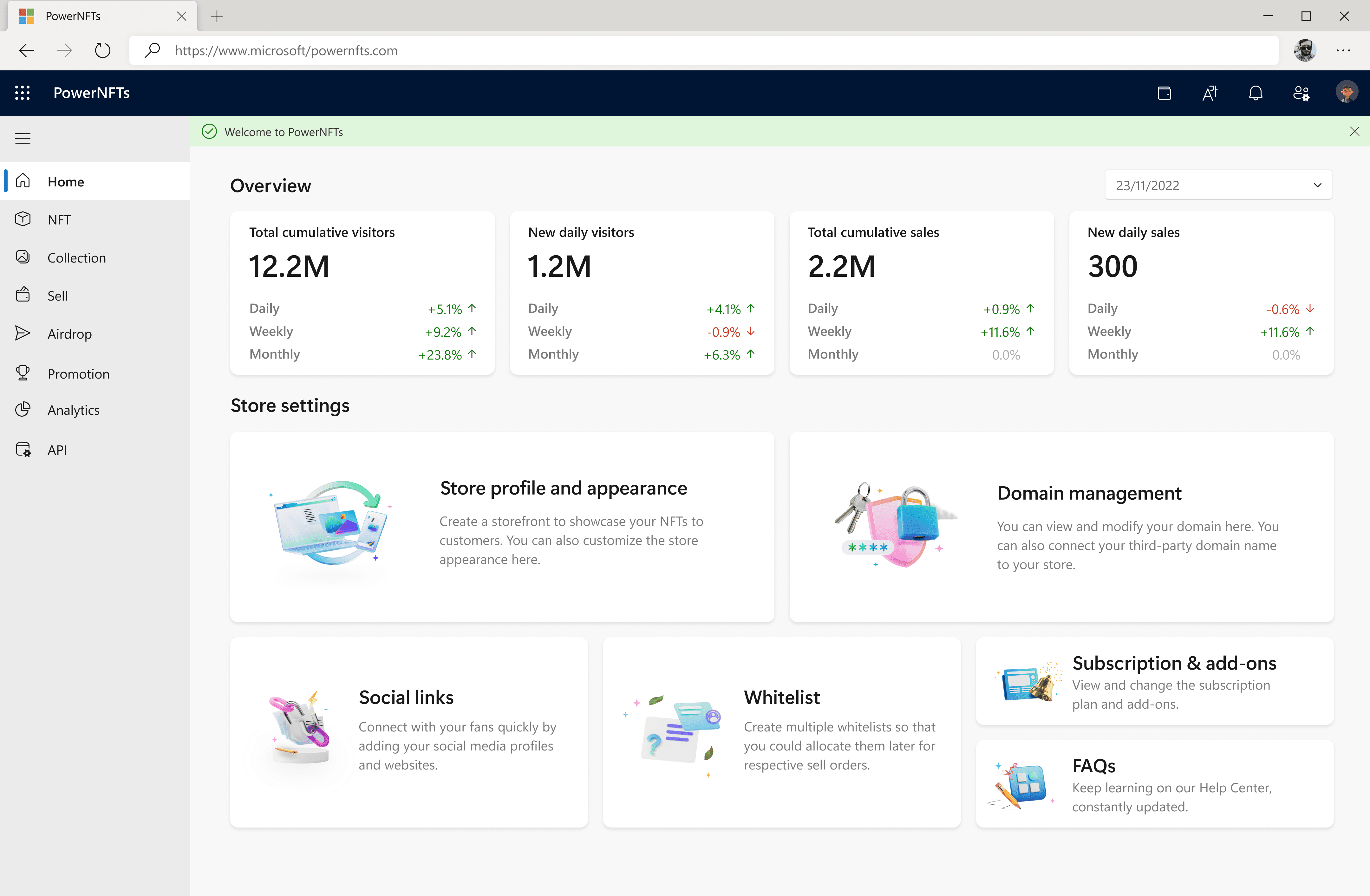
PowerNFT

/

Landing Page

PowerNFT

/

Dashboard

1

/2

PowerNFT

/

Landing Page

PowerNFT

/

Dashboard

1

/2

PowerNFT

/

Landing Page

PowerNFT

/

Dashboard

1

/2

PowerNFT

/

Landing Page

PowerNFT

/

Dashboard

1

/2

Storefront Framework

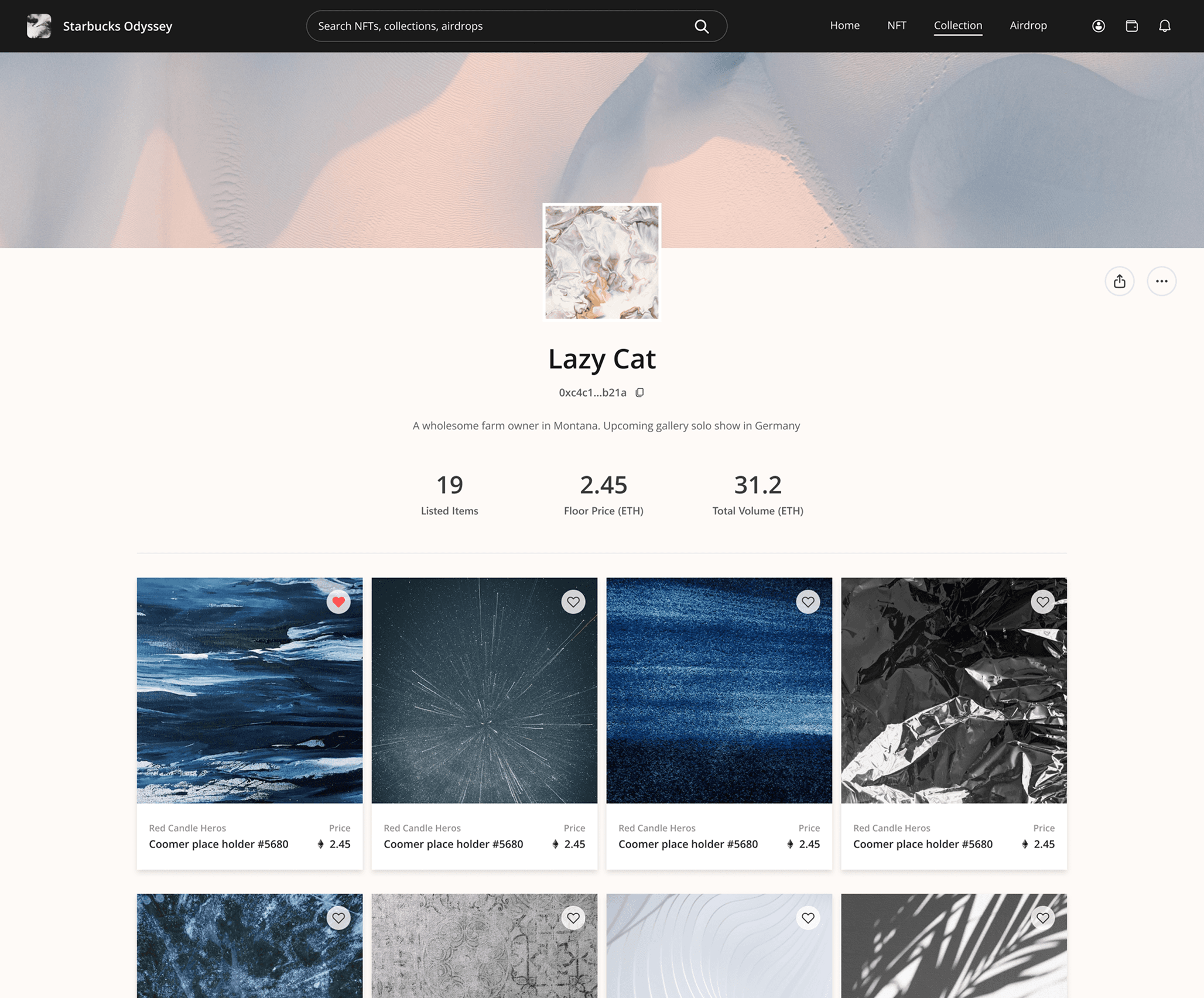
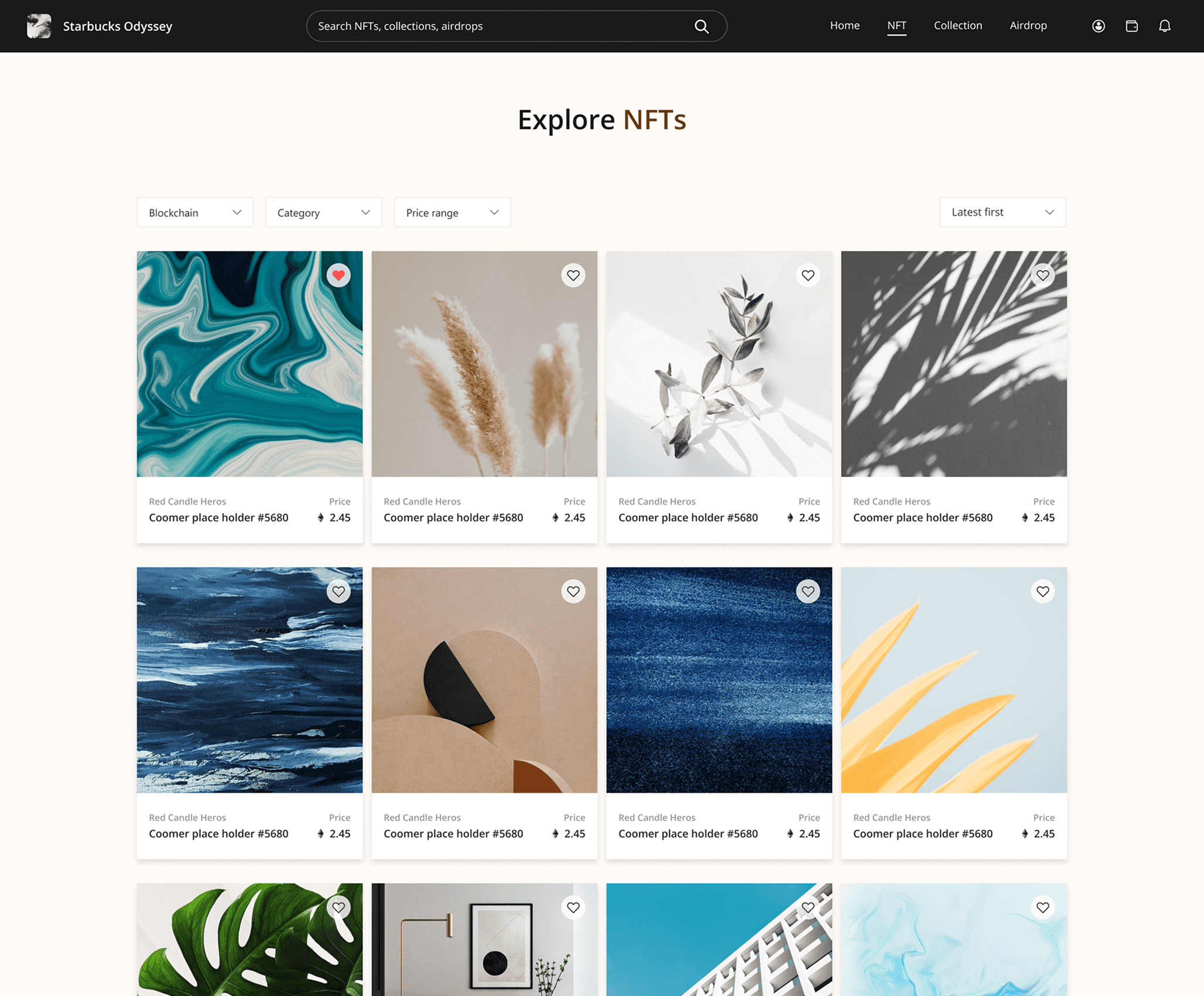
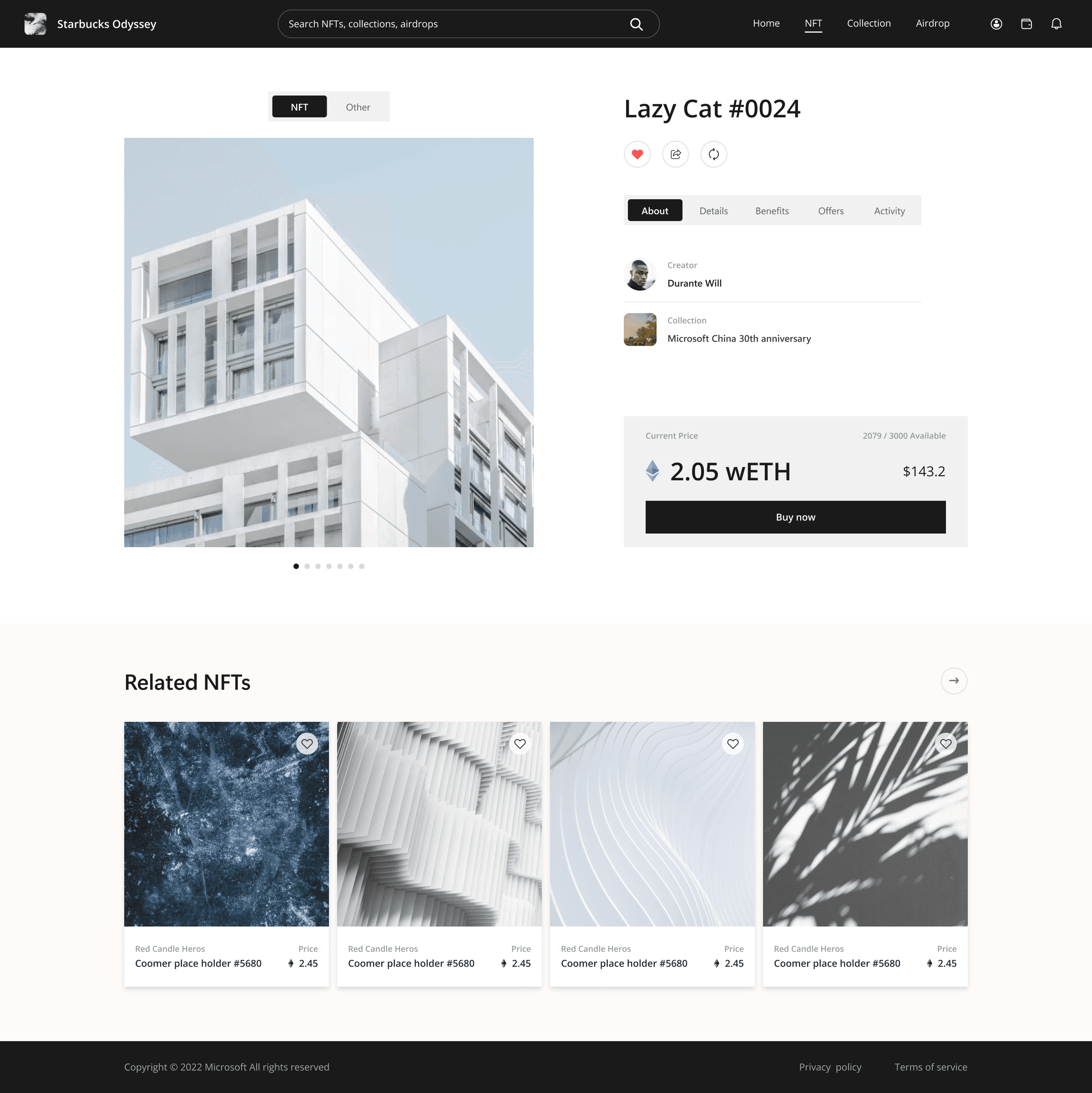
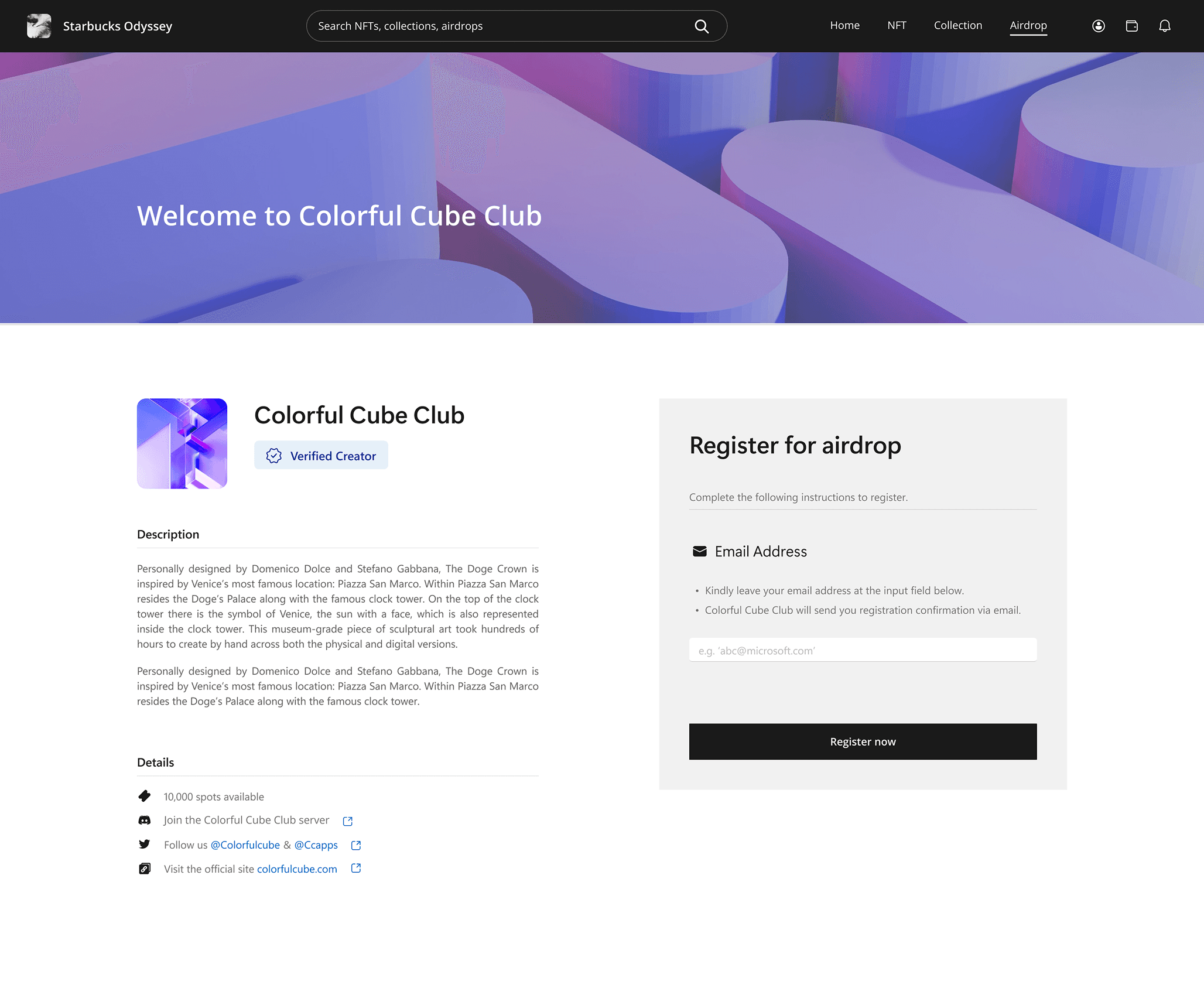
To streamline NFT trading, PowerNFT runs a marketplace with a standardized storefront framework, in which onboarded businesses can publish their NFTs for sale and launch marketing campaigns.

Storefront

/

Homepage

Storefront

/

Collection Gallery

Storefront

/

Collection Detail

Storefront

/

NFT Gallery

Storefront

/

NFT Detail

Storefront

/

Airdrop Page

1

/3

Storefront

/

Homepage

Storefront

/

Collection Gallery

Storefront

/

Collection Detail

Storefront

/

NFT Gallery

Storefront

/

NFT Detail

Storefront

/

Airdrop Page

1

/3

Storefront

/

Homepage

Storefront

/

Collection Gallery

Storefront

/

Collection Detail

Storefront

/

NFT Gallery

Storefront

/

NFT Detail

Storefront

/

Airdrop Page

1

/3

Storefront

/

Homepage

Storefront

/

Collection Gallery

Storefront

/

Collection Detail

Storefront

/

NFT Gallery

Storefront

/

NFT Detail

Storefront

/

Airdrop Page

1

/3

Storefront Setup

Before listing NFTs, Web3 brands need to complete a storefront setup flow on PowerNFT. In the process, they pick a theme aligned to their business domain; the chosen theme will then be applied across the entire storefront.
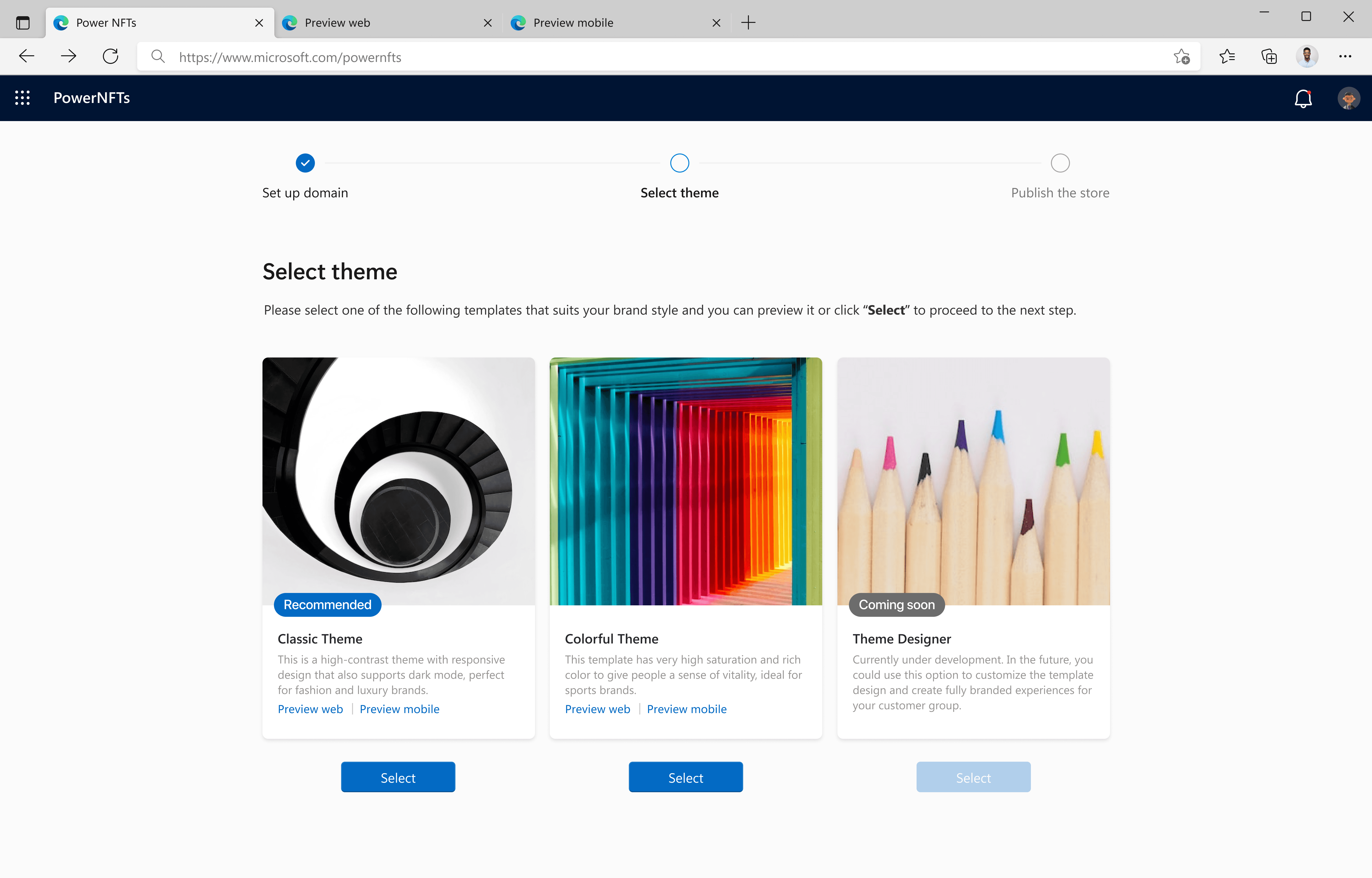
PowerNFT

/

Store Configuration Flow

Dual Store Themes

Prior to Theme Designer, PowerNFT only offered 2 storefront theme templates for all brands to choose. Each template featured a unique visual style and was created to suit specific types of business.
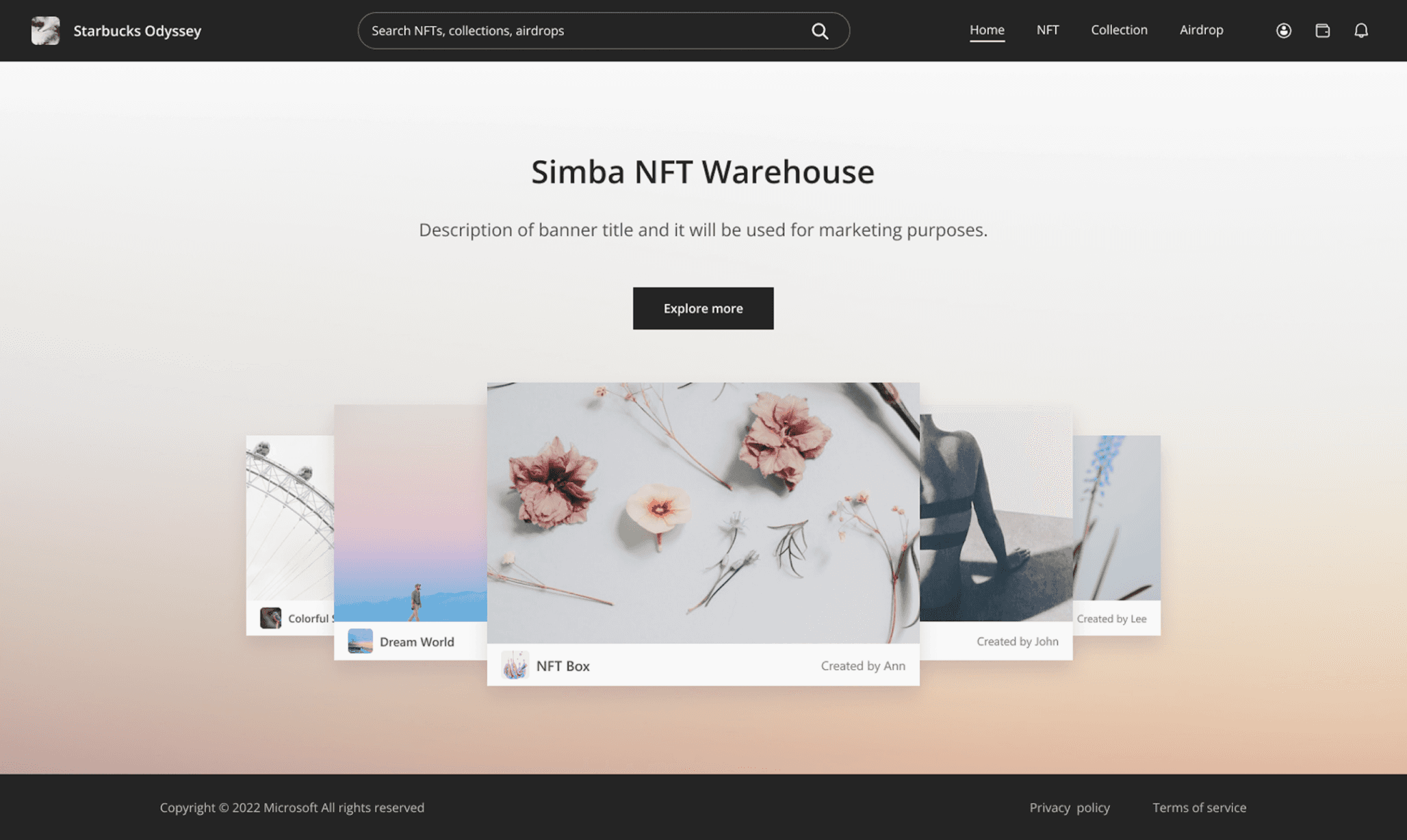
Storefront

/

Classic Theme
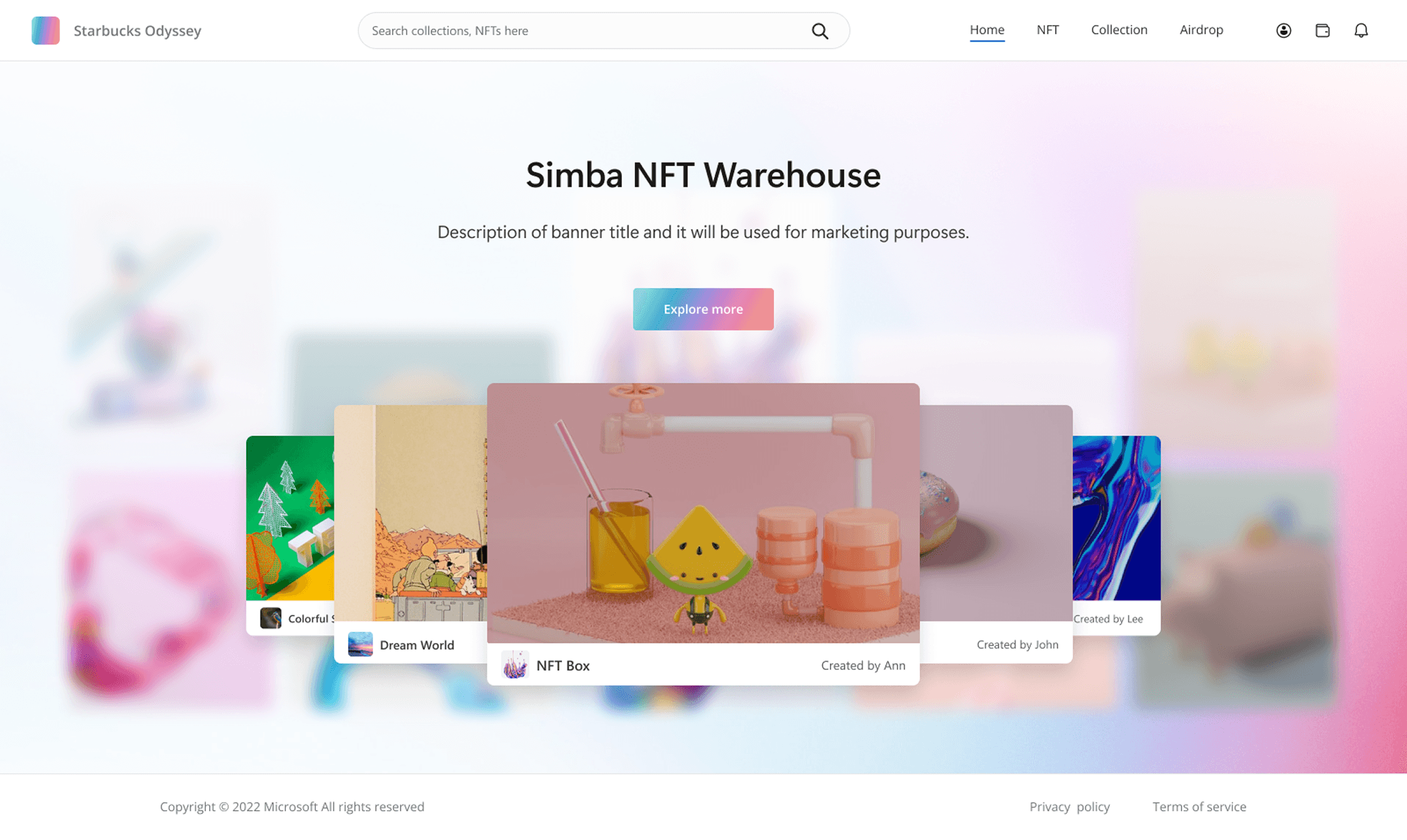
Storefront

/

Colorful Theme

Templates Falling Short

However, many brands came in with their existing visual identities and found the preset storefront styles limiting. As such, they demanded more flexibility to tailor themes to match their branding.

The PRoblem

The PRoblem

The PRoblem

Enable Web3 brands to edit storefront themes with more flexibility

Enable Web3 brands to edit storefront themes with more flexibility

Enable Web3 brands to edit storefront themes with more flexibility

User Needs

Based on client input, we distilled the core needs for theme customization and targeted brand store admins as the main users in charge of storefront creation, maintenance, and editing.

Differentiation

Users want to distinguish the brand from others through a unique storefront.

Users want to make their brands stand out with a unique store.

Users want to make their brands stand out with a unique store.

Alignment

Users want to make the storefront look align with established branding.

Users need to align the store look with established branding.

Users need to align the store look with established branding.

Ease of Use

Users expect to customize the storefront appearance with ease.

Users expect to customize their storefront style with ease.

Users expect to customize their storefront style with ease.

Introducing

Introducing

Introducing

Theme Designer

Theme Designer

Theme Designer

Web3 · Enterprise SaaS · Design System

Web3 · Enterprise SaaS · Design System

Web3 · Enterprise SaaS · Design System

Design Strategy

Theme Designer adopted a top-down design strategy on theme customization. The “top” part covers general settings such as color palette and typography. It helps admins apply style changes across the store, ensuring high efficiency.

The "down" part handles page-specific elements—like text and CTA labels that can vary by page. This enables local edits while keeping other elements intact, granting store admins more flexibility at the page level.

Theme Designer

/

Design Strategy

General Settings

In general settings, I focused on the following categories since they appear on every page and are easy to scale globally.

Template Selection

Template Selection

Template Selection

Pick a default theme as a starting point for customization

Pick a default theme as a start for styling

Pick a default theme as a start for styling

Typography Settings

Typography Settings

Typography Settings

Change typeface across the storefront in a few clicks

Swap typeface across the store in a few clicks

Swap typeface across the store in a few clicks

Color Settings

Color Settings

Color Settings

Adjust colors at scale—buttons, text, and more

Header/Footer

Header/Footer

Header/Footer

Set header/footer styles and propagate to all pages

Set header/footer styles and apply to all pages

Set header/footer styles and apply to all pages

Template Selection

To start, admins can pick a default theme from the left panel. Each will provide presets to serve as a styling baseline, avoiding full manual setup.

General Settings

/

Theme Selection

Store Text Hierarchy

Before delving into typography settings, I dissected every storefront page and categorized all the text elements based on hierarchy and semantics, assigning labels ranging from “H1” all the way to “Caption” to each category.
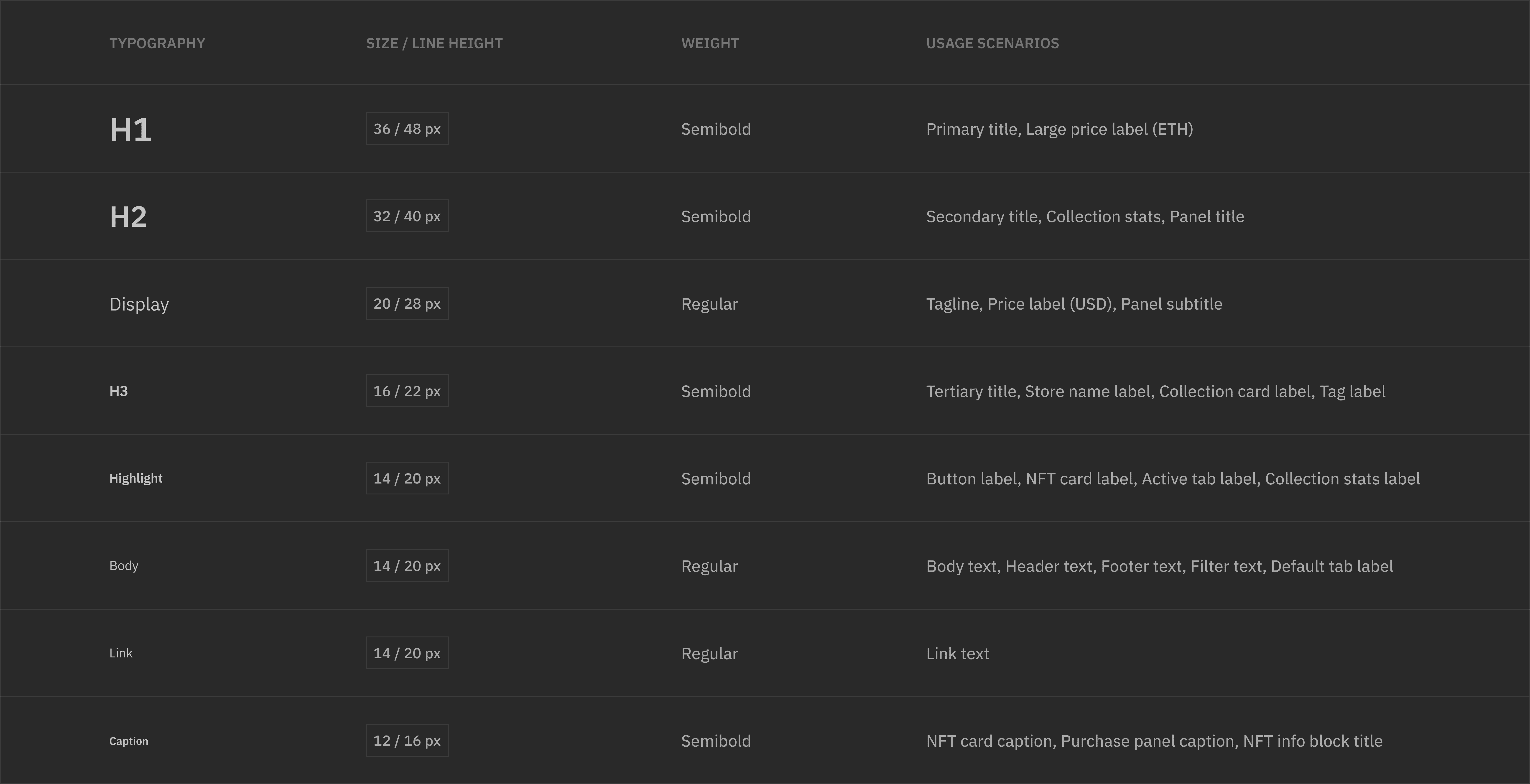
General Settings

/

Text Hierarchy

Typography Settings

The text hierarchy served as guidance for designing typography settings. Each typeface dropdown corresponds to one text category, allowing admins to pick the preferred fonts for various text elements across the store.
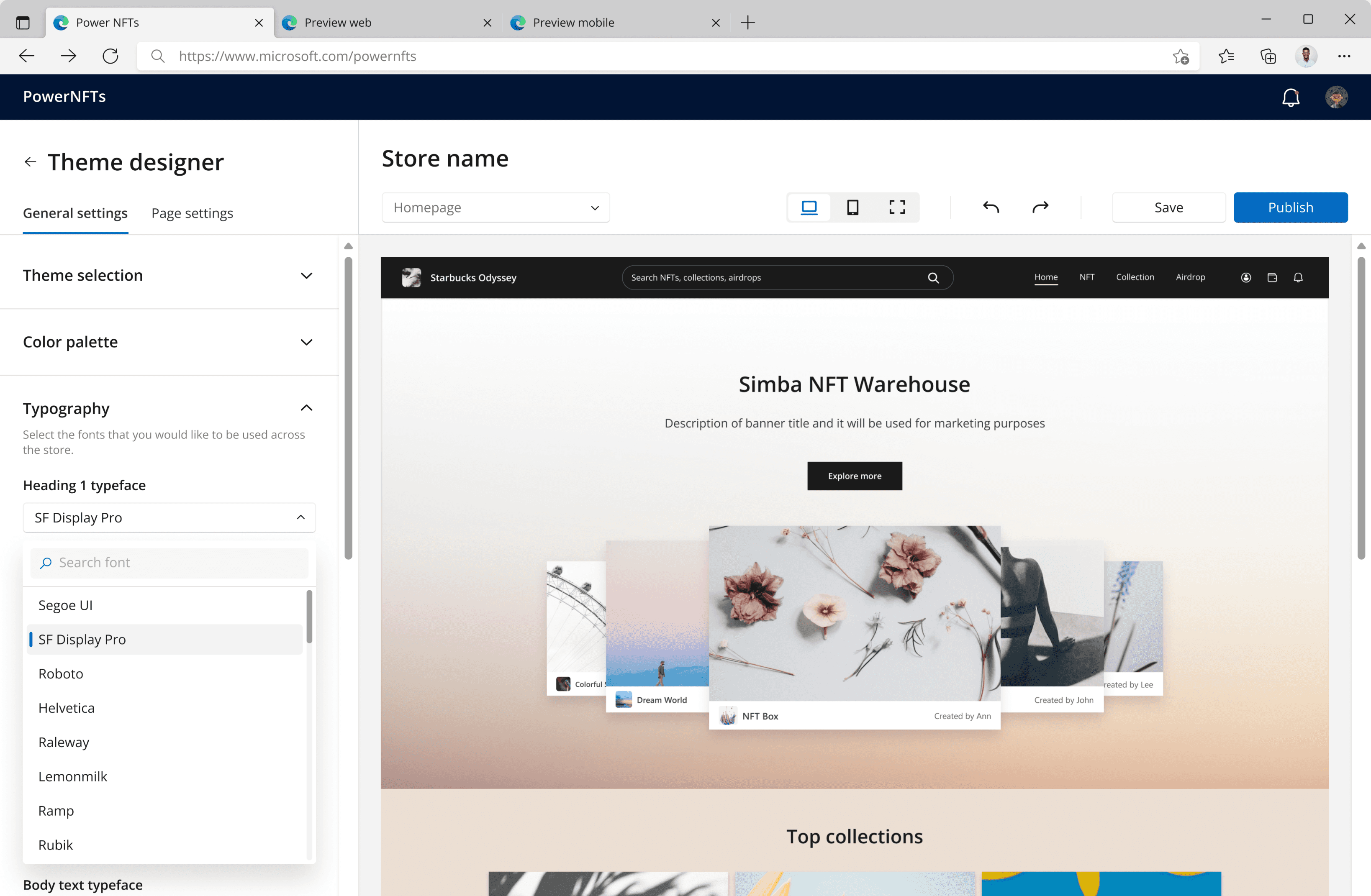
General Settings

/

Typography Settings

Color Settings

Color settings help admins change colors on different elements, including text, buttons, and page backgrounds.

General Settings

/

Color Settings

Header/Footer Settings

Header and footer settings enable admins to customize various components in the header and footer, such as background color, icon, and search bar.
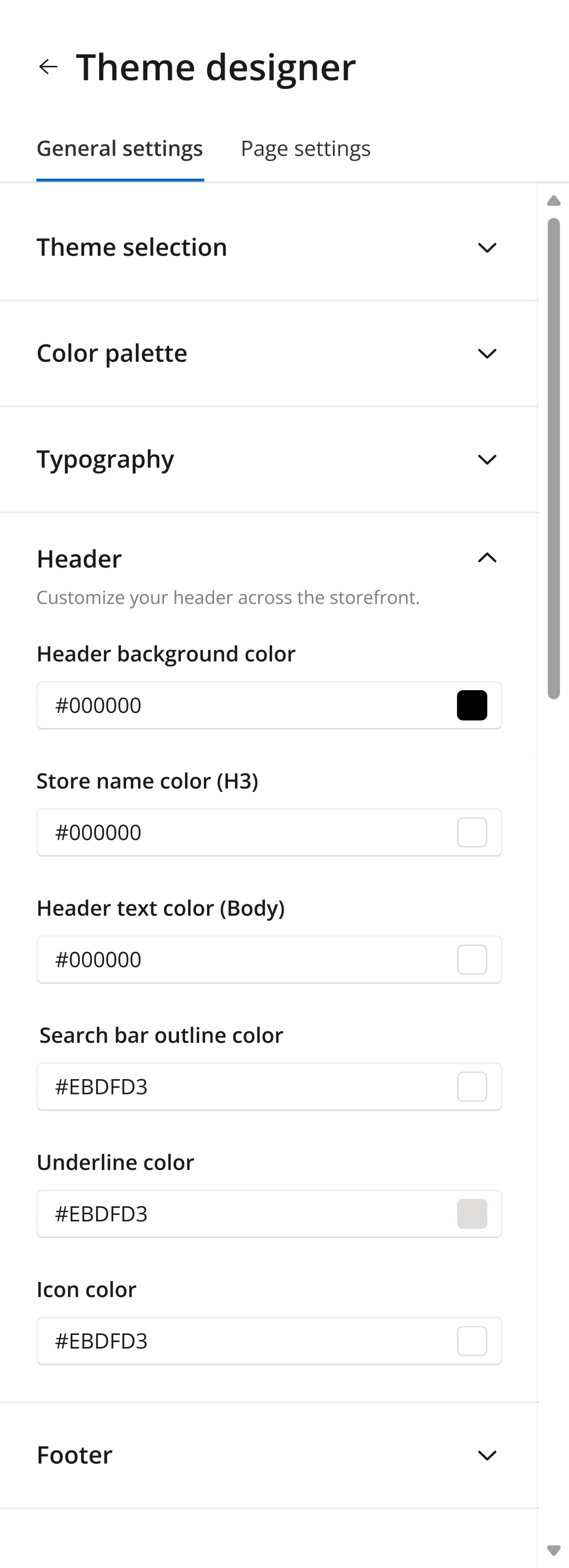
General Settings

/

Header

General Settings

/

Footer

Page Settings

For page settings, I identified six categories, including text, page background, buttons, card grid, carousel, and other settings such as tags and filters.

Page Settings

/

Setting Categories

Text Editing

In text settings, admins can edit copy content through a text editor. Formatting tools are also available to make text bold, italic or change its color.
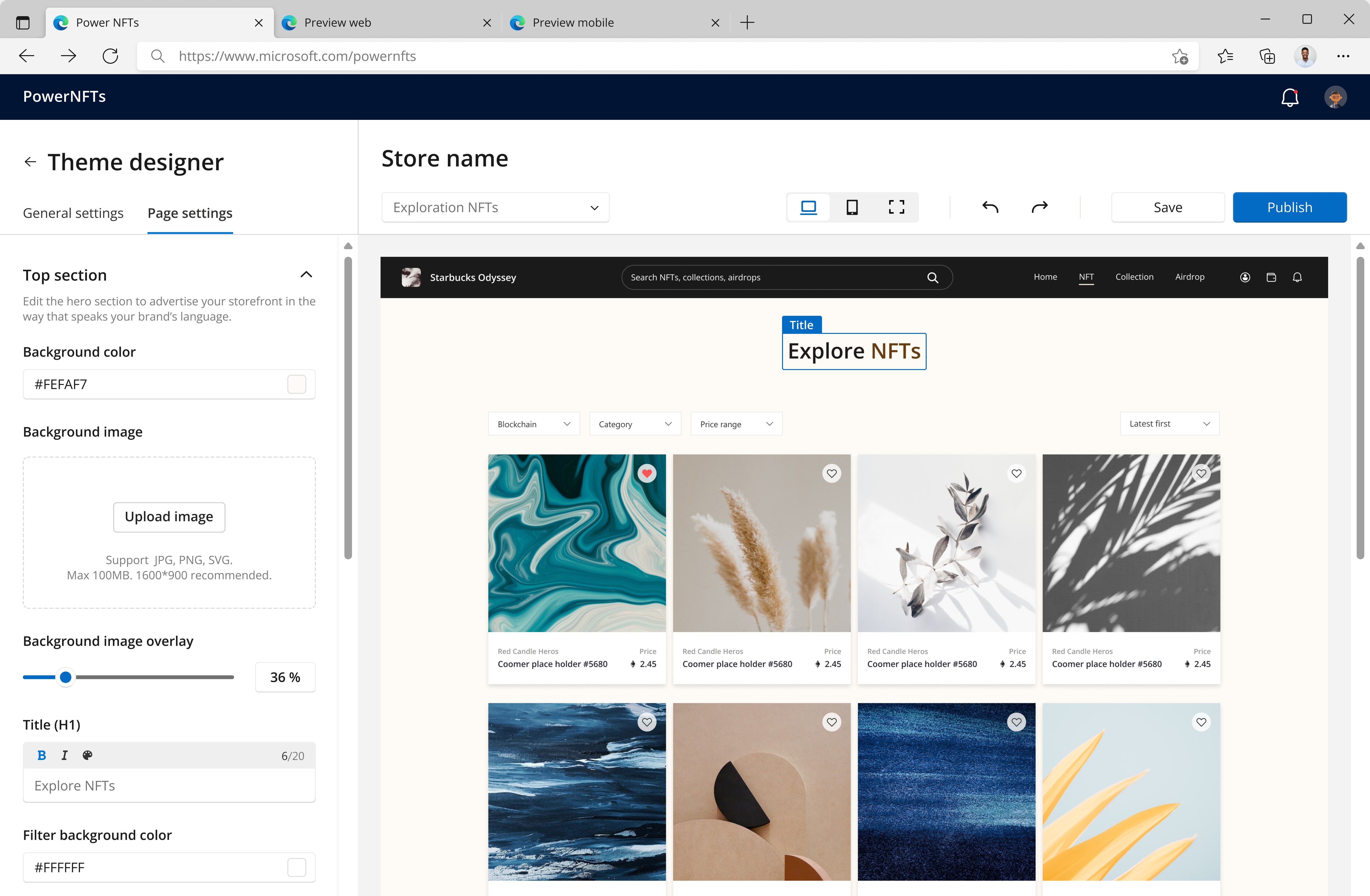
Page Settings

/

Text Settings

Page Background

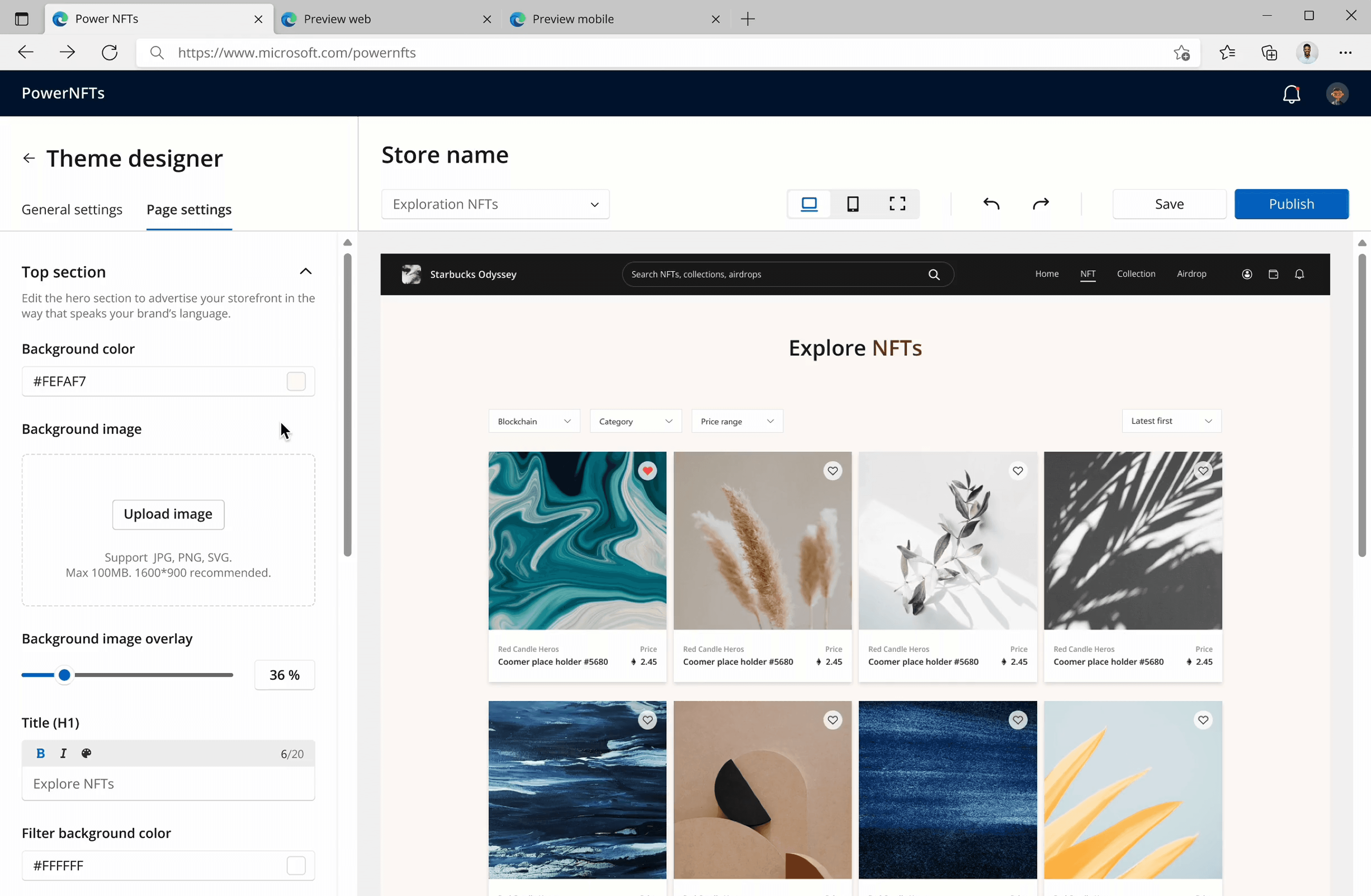
Admins can fill backgrounds with a color or image. The image overlay feature helps keep proper contrast when text sits on the image, while the focal point control lets admins choose which part of the image stays in view.
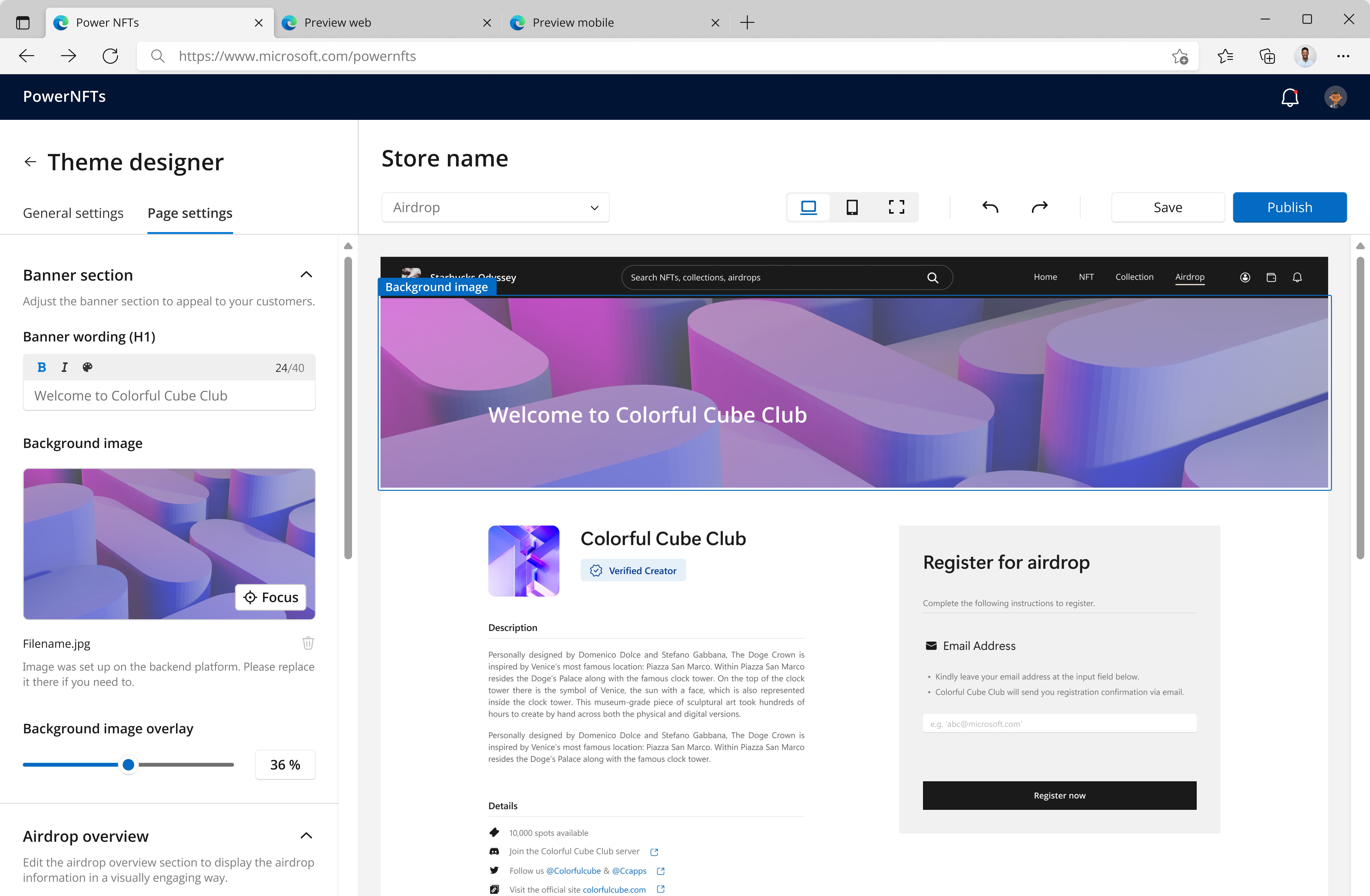
Page Settings

/

Background Settings

Button Settings

In button settings, admins can edit the label, adjust fill and border styles, and set the destination to an internal page or external URL.
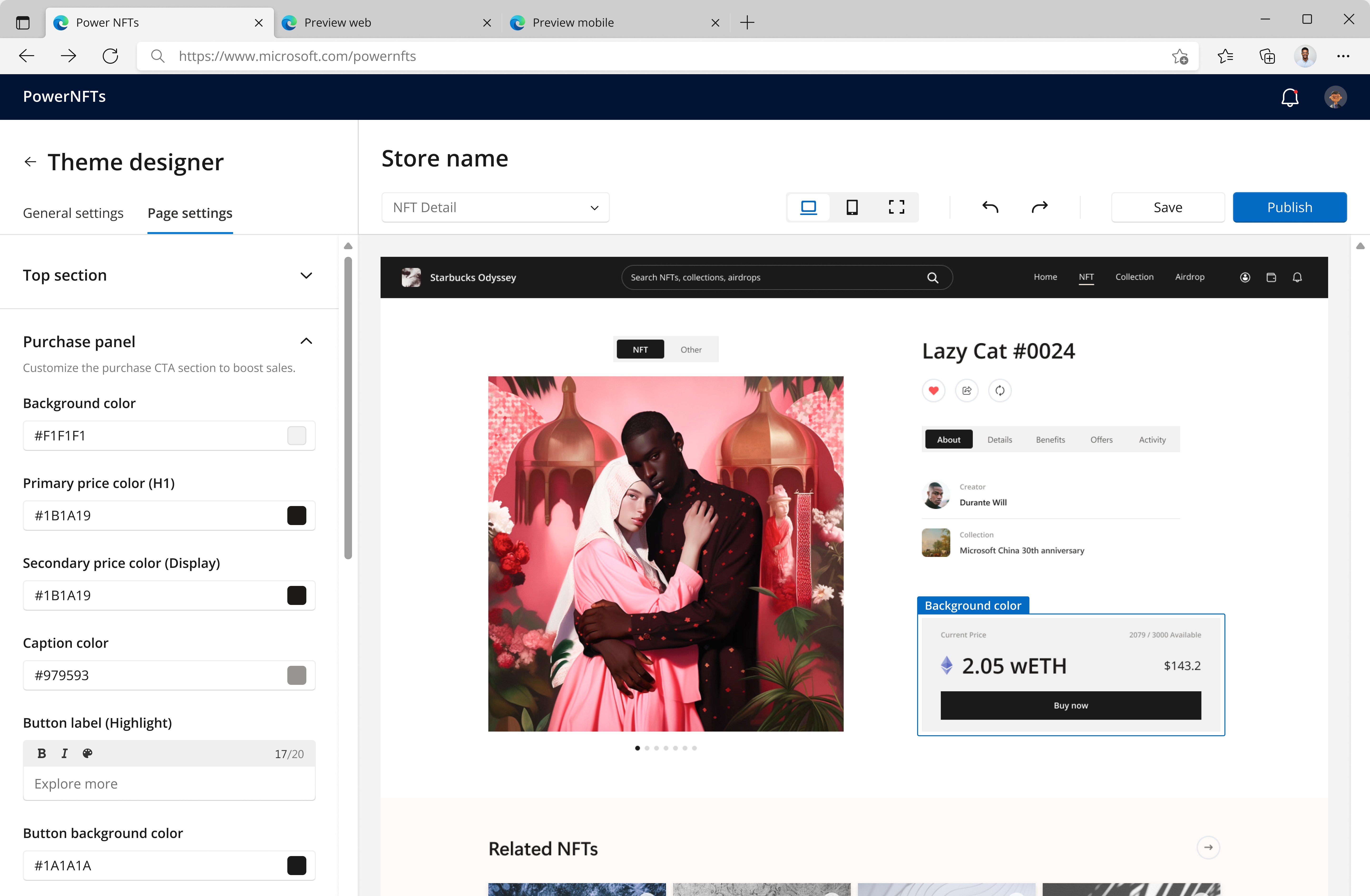
Page Settings

/

Button Settings

Card Grid Settings

Card grid settings let admins control card visual styles, such as color, shadow, and spacing. The spacing settings set horizontal/vertical gaps between cards, and the shadow settings help adjust the shadow color, offset, and blur.

Page Settings

/

Card Grid Settings

Carousel Settings

In carousel settings, admins can choose from 3 layout options and display up to 5 NFT collections to highlight the store’s offerings.

Page Settings

/

Carousel Settings

Design Iterations

Over 6 months, I kept refining the Theme Designer experience, starting from core settings like color and typography to advanced controls such as spacing and shadows, giving admins greater flexibility for storefront styling.

Before

Dual Button Switch

Version 1.0 only allowed admins to select either filled (solid) or outlined (stroke) buttons, but more complex styles often involve a mix of both.

After

More Flexible Button Styling

In Version 2.0, users can adjust button fill and outline styles separately, with added control over outline size and position.

1

/3

Before

Dual Button Switch

Users could only select filled (solid) or outlined (stroke) buttons, but complex styles often involve a mix of both.

After

More Flexible Button Styling

Users can adjust both button fill and outline styles, with added control over outline size and position.

1

/3

Before

Dual Button Switch

Users could only select filled (solid) or outlined (stroke) buttons, but complex styles often involve a mix of both.

After

More Flexible Button Styling

Users can adjust both button fill and outline styles, with added control over outline size and position.

1

/3

Before

Dual Button Switch

Version 1.0 only allowed admins to select either filled (solid) or outlined (stroke) buttons, but more complex styles often involve a mix of both.

After

More Flexible Button Styling

In Version 2.0, users can adjust button fill and outline styles separately, with added control over outline size and position.

1

/3

The Results

The Theme Designer MVP was implemented by devs in 2023. Later, it became a key PowerNFT add-on that reinforced Microsoft’s partnership pitch to major brands entering Web3, including Starbucks, Universal Studios, and Pop Mart.

More Projects

Historiq

Historia Studio

|

2025

Review Center

IBM

|

2021

Back

Sound

[

off

on

]

Background

[

off

on

]

Back

Sound

[

off

on

]

Background

[

off

on

]

Back

Sound

[

off

on

]

Background

[

off

on

]

Back

Sound

[

off

on

]

Background

[

off

on

]

@ 2026 Xi Pang All Rights Reserved.

@ 2026 Xi Pang All Rights Reserved.

@ 2026 Xi Pang All Rights Reserved.

@ 2026 Xi Pang All Rights Reserved.